🗂️
Organize into classes
Group students into tabs for each class, period, or tutoring group, and switch between them in a tap.
Give every student a story-based DISC journey, then see your whole class on one screen. Spot who's thriving and who needs a nudge, set goals in a click, and understand how each student learns — with no grading and no setup headaches.
Every student you teach, organized into classes — with the stats that tell you who's thriving and who needs you.
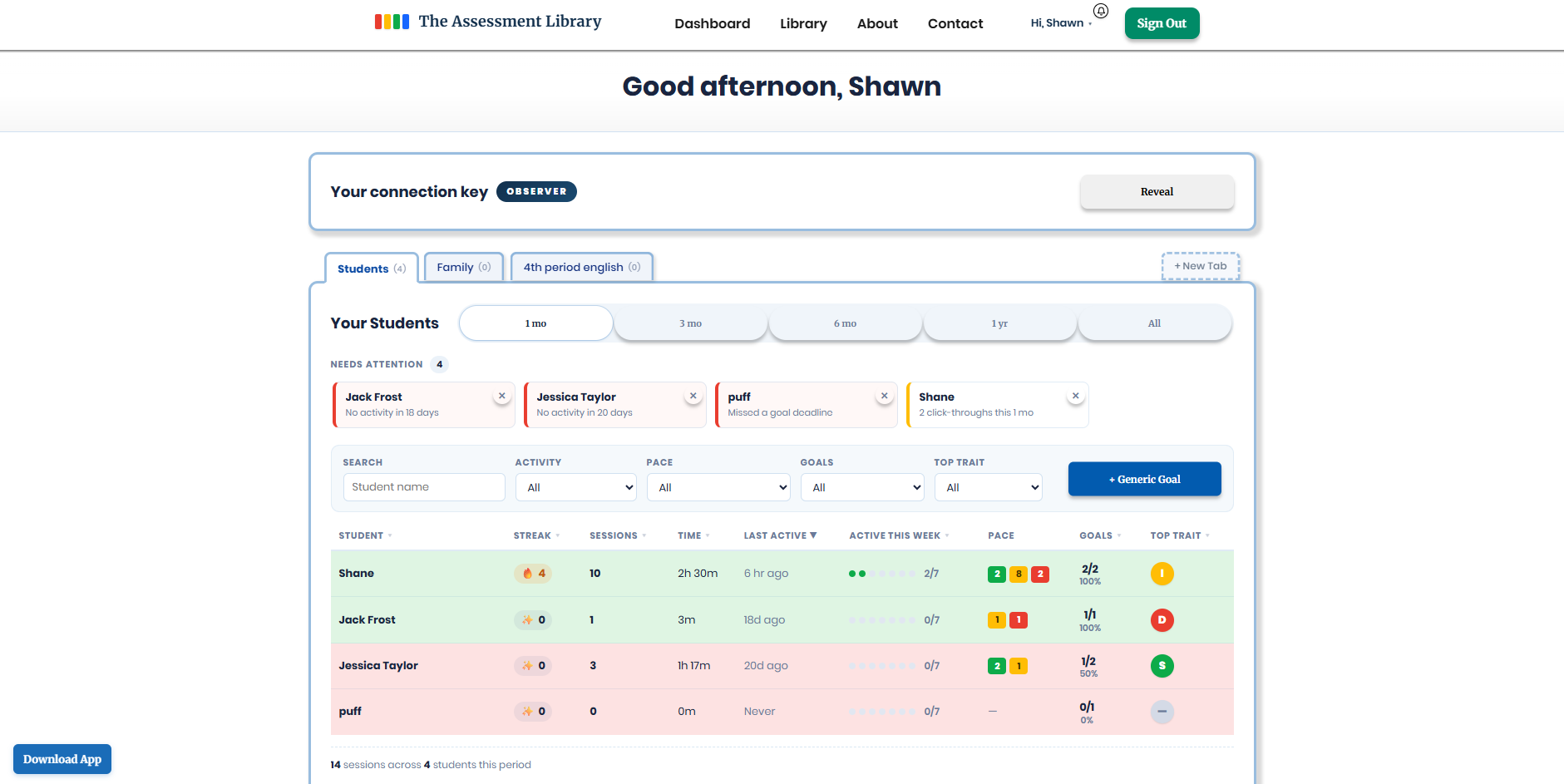
Group students into class tabs — like “4th Period English”.
Needs attention triages who's gone quiet or started rushing.
Streak, sessions, pace, goals, and top DISC trait — per student.
Everything you need to keep a whole roster engaged — without extra busywork.
Group students into tabs for each class, period, or tutoring group, and switch between them in a tap.
Automatic alerts surface students who've gone quiet or started rushing — triage your whole roster in seconds.
Assign one goal to every student at once, with deadlines and rewards. Each student's progress is tracked independently.
Pace and timing reveal whether a student is truly reading or just clicking through to the end.
Reading, not just clicking — caught early, before it shows up in results.
Every assessment is timed. The Library flags each session as ideal, rushed, or a click-through, and even charts time per question — so you can tell the difference between a student who's engaged and one racing to the finish.
Every student builds a DISC profile across the stories they read — filter your class by trait and tailor your approach.
Driven and direct — give them challenges and choices.
Social and expressive — let them share and collaborate.
Patient and steady — offer reassurance and routine.
Precise and thoughtful — give them detail and time.
The same DISC results that power your dashboard become a social-emotional learning tool — turning each student's self-insight into empathy for the whole class.
See your whole class's DISC mix on one map — who's alike, who balances whom, and a plain-language “how to work with them” tip for every student.
Drag students into balanced or complementary teams on a top-down room board, get suggested roles and group dynamics, then print the groups or assign work to a table in a tap.
Students predict a classmate's style, then see how close they were — a low-stakes empathy game that makes perspective-taking concrete. Private by design, with a per-student parent opt-out.
Every part of the experience maps to the five core competencies from the CASEL framework — so it fits the social-emotional learning and character goals your school already has.
Students discover their DISC style through story choices and see how they tend to react, lead, and learn.
In the app: personal DISC results
Students work toward the goals you set and can see their own reading pace and engagement over time.
In the app: goals & pace
The class map helps students recognize and respect how classmates who think differently feel and work.
In the app: class map & tips
Mixed-style teams and “teach me your way” pairings build communication, teamwork, and healthy disagreement.
In the app: team builder
Story-based scenarios put students in realistic situations where they weigh options and see where their choices lead.
In the app: story assessments
CASEL refers to the Collaborative for Academic, Social, and Emotional Learning and its widely used SEL framework. The Assessment Library is not affiliated with or endorsed by CASEL.
You'll be teaching with insight in just a few minutes.
Sign up on the observer page — it works for teachers, tutors, and coaches. Add your school or organization name so families recognize you.
You'll get a friendly code like LIGHTHOUSE-7K2X. Send it to parents or students so they can connect their progress to your dashboard.
As students connect, they appear on your dashboard. Drag them into class tabs, set goals, and start spotting exactly who needs you.
Each student (or their parent) connects by pasting your key on their own Dashboard, under “Shared with” — and can disconnect at any time.
Built so families trust you with a window into progress, nothing more.
You see progress and DISC results — never a student's individual answers — and you can never change their account.
A parent or student connects to you by entering your key, and they can disconnect at any time.
Goal rewards are your choice or in-app story tokens. Students never spend real money.
Watching one child as a parent or grandparent?
See The Assessment Library for Families →Book a free demo or a guided learning session — we'll help you set up your roster and get the most from your dashboard.
Create your educator account and share your key with your students today.